How to Play
- Load a game: Paste a Google Sheet link shared as "Anyone with link can view". Every loaded game gets a fresh game code.
- Game code: The code at the right end of the scoreboard is the one players' phones will join for Final Jeopardy. Click it to switch to a brand-new code if phones ever seem to be in the wrong game.
- Rename a team: Click a team name on the scoreboard to edit it.
- Turn order: A random team goes first when a game loads, then turns rotate automatically. Whoever's turn it is glows gold on the scoreboard.
- Answer a question: Click SHOW ANSWER to reveal it (the popup glows blue) — this also unlocks CORRECT and WRONG. Click one to score the box value to the current team and move to the next team's turn.
- Select team: Click "SELECT TEAM" to manually set who leads the current round — turn order then continues from there.
- Daily Double: Points are automatically doubled when you use CORRECT/WRONG on a Daily Double box.
- Fix a mistake: Click "RESET CELL", then click the greyed-out box that was selected in error to ungrey it.
- Adjust a score: Click a team's score number to type in a corrected value.
- Correct / wrong sounds: Put
correct.mp3andwrong.mp3in the same folder and they play when you click CORRECT/WRONG (and ✓/✗ in Final Jeopardy). - Think music: Click "THINK MUSIC" (bottom-left, also visible during Final Jeopardy) any time to play a countdown with music. Click again to stop. To use your own track, put a file named
think-music.mp3in the same folder; otherwise an original 30-second tune plays. - Final Jeopardy: Click "FINAL JEOPARDY". If any team is below zero, everyone gets +500 first. A QR code and game code appear — players scan it on their phones, pick their team, and enter a wager. Once all three wagers are in, reveal the question (from sheet cell F2) to their phones. Once all three answers are in, reveal the correct answer (cell F3), then reveal and grade each team's answer one by one and see the final ranking.
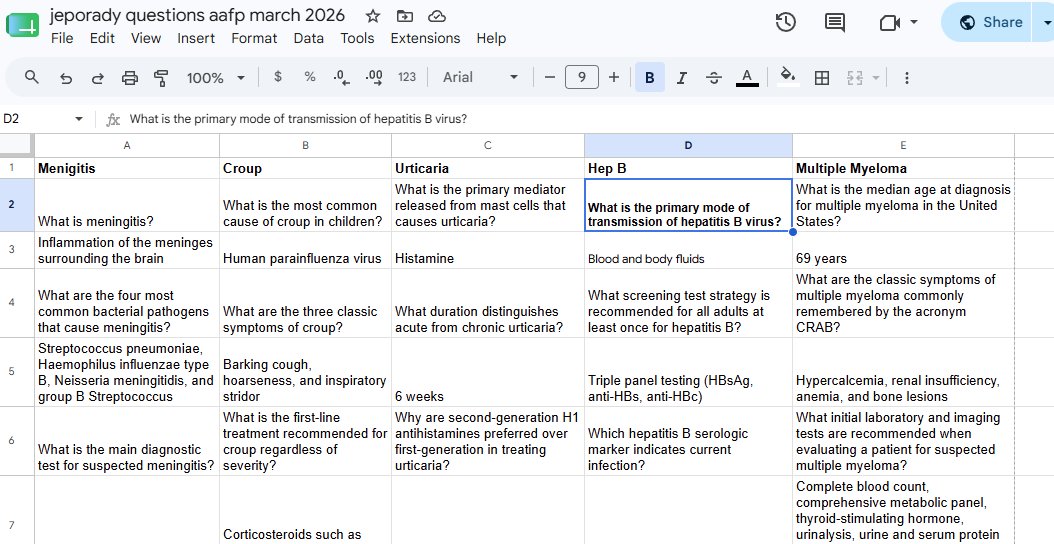
Sheet layout example — categories across row 1, then question/answer alternating down each column. Final Jeopardy question goes in cell F2, and its answer in cell F3: